Frequently asked questions
Everything you need to know about phone compatibility, activation, shipping, returns and more.
General
When will my order arrive?
We ship most orders within 24 hours, Monday through Saturday, so the majority arrive within just a few business days. You'll receive tracking as soon as your order leaves our warehouse. If it's taking longer than you expected, here's how to reach us:
- Log into your Walmart account and open your Purchase History. Find the order, select View Details, then click Contact Seller.
Why is my order delayed or not moving?
If your tracking hasn't updated in a while, the package is usually just running behind with the carrier — or, in rare cases, it's been lost in transit.
Once tracking shows no movement for more than 5 business days, the order is considered lost in transit, and Walmart automatically refunds any order in that situation.
To start the refund, call Walmart at +1-800-925-6278 and let them know your order is lost in transit.
Can I cancel or change my order?
Yes — as long as your order hasn't shipped yet. You can cancel it yourself from the Orders page in your Walmart account.
Orders can be cancelled up until our daily shipping cutoff of 4:00 PM EST. After that, the order is already on its way and can no longer be changed or cancelled.
Need to change the model, color, storage, or address? Cancel the original order before the cutoff and simply place a new one.
My tracking says delivered but I didn't receive it - what do I do?
If tracking shows your package as delivered but it hasn't arrived, don't worry — this is usually resolved quickly. Reach out so we can look into it for you:
- Log into your Walmart account and open your Purchase History. Find the order, select View Details, then click Contact Seller.
Is the phone new and not used?
Yes — unless a listing says otherwise. If a listing doesn't mention condition, the item is brand new.
Open Box and Used items are always clearly labeled as such in the listing, so you'll know exactly what you're getting.
If you receive an item sold as new that looks used or open-box, please contact us right away and we'll make it right.
I received the wrong item or something is missing - how do I fix it?
We're sorry for the mix-up. Please contact us with your order number and we'll review our records on our end and get the correct item to you as quickly as possible.
My device arrived damaged or isn't working - what do I do?
We're sorry to hear that — we'll make it right. Please inspect your device as soon as it arrives and reach out to us right away if anything is wrong.
Contact us through our Walmart seller page (see "How can I contact you?" below) with your order number and a short description of the issue. Photos are very helpful for any physical damage.
From there we'll help you troubleshoot or arrange a replacement or refund. Every item is covered by a 1-year warranty, and you can also start a return directly from your Walmart account.
Does this phone use a physical SIM or an eSIM?
It depends on the model. Many newer phones support both a physical SIM and an eSIM (dual SIM), while some use just one. If you'd like help confirming what a specific model supports, just contact us.
Does this phone support dual SIM?
Dual SIM support varies from model to model. If you're not sure whether a particular phone supports it, contact us and we'll confirm before or after you buy.
Is the phone unlocked and will it work with my carrier?
Yes — every phone we sell is factory unlocked, so it isn't tied to any carrier. If you have trouble activating it, the Phone Compatibility & Activation section below covers the most common fixes, or you can contact us and we'll help.
How do I find the IMEI or activate the phone?
The IMEI is printed on the phone's box. You can also turn the phone on and go to Settings > About phone to view it.
To activate the phone, simply turn it on and insert your SIM (or set up an eSIM). If your carrier needs extra steps, the Phone Compatibility & Activation section below walks you through it.
Is this the US version of the phone?
This varies by listing — some phones are US models and some are global/international versions (both work in the US). The product listing specifies which one you're getting. If you're unsure, contact us and we'll confirm.
Is the phone genuine and factory-sealed?
Absolutely — all of our devices are 100% genuine. Brand new phones arrive factory sealed and look brand new.
Open Box items aren't sealed but are in like-new condition, sometimes with minor box wear. Used items don't include the original box and may or may not come with the original charger. Every listing tells you exactly which condition you're buying.
How do I return an item?
Returns are handled through Walmart and only take a minute:
- Open the Walmart app and tap Account in the bottom-right corner.
- Tap on Purchase History.
- Select the order and the specific item you want to return.
- Tap the Start a Return button.
- Choose your reason for the return and your preferred refund method.
- Select your return method: "In-store" (generates a QR code) or "Return by mail" (generates a shipping label).
If this option doesn't appear on your account, please contact us.
When will I get my refund?
Once we receive your return, refunds are typically issued within 2-3 business days. If you returned the item to a physical Walmart store, please allow an extra 2-3 weeks for them to ship it back to us before the refund is processed. After that, your bank may take a few more days to post it.
Is there a warranty, or can I get a replacement?
Yes — every item comes with a 1-year warranty. If something goes wrong, contact us and we'll walk you through your options, including a replacement where applicable.
Do you offer any discounts?
We keep our prices low year-round, so we don't usually run extra discounts — but we do offer special pricing during major holiday sales. It's worth checking our store during those times for the best deals.
How can I contact you?
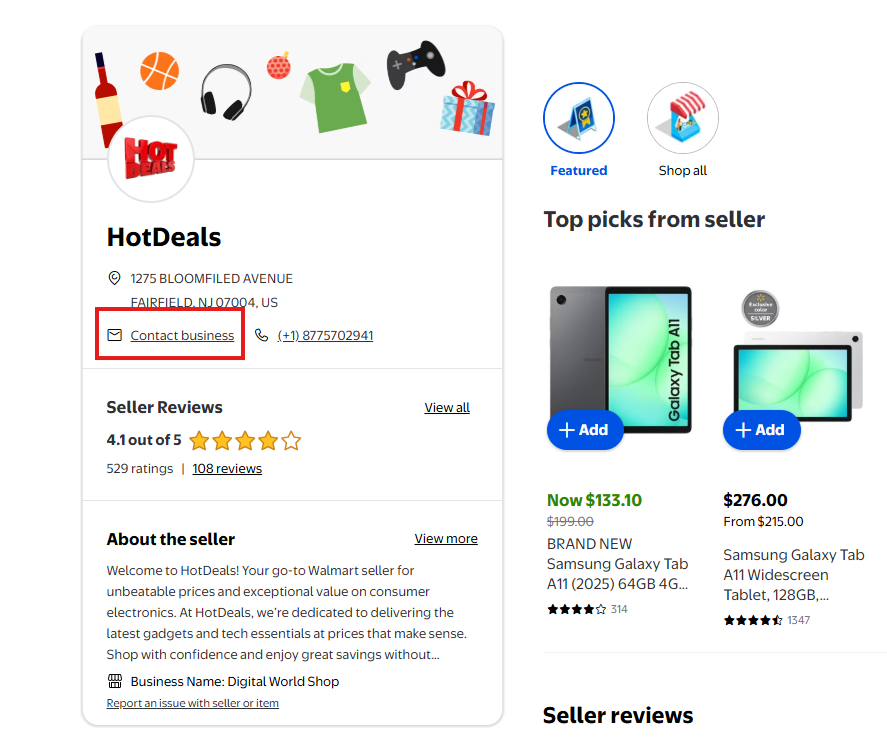
The best way to reach us is through our Walmart seller page:
- Click this link to open our Walmart seller page.
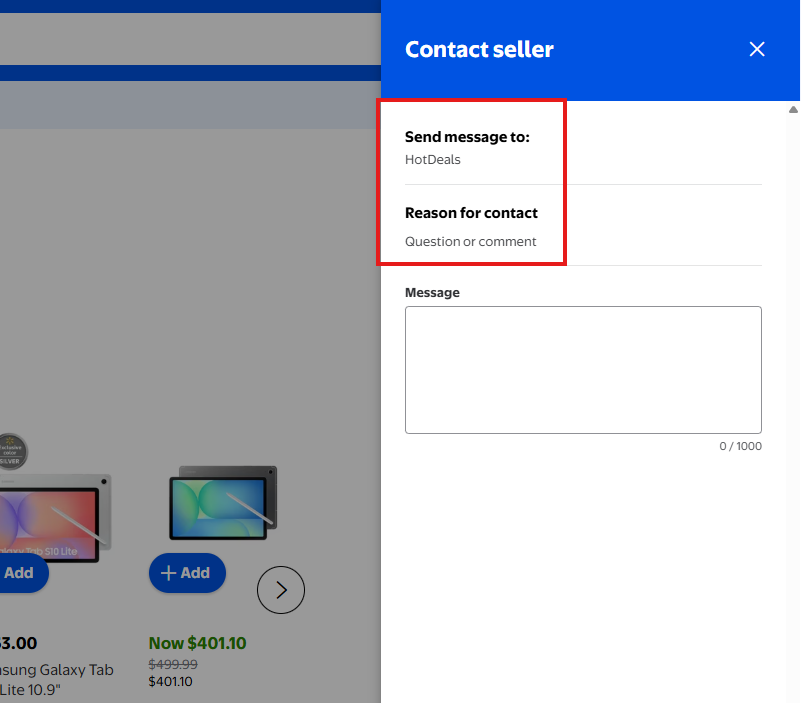
- On our seller page, press Contact business.
- Write your message — please include your order number — and send it. We'll get back to you as soon as we can.
Phone Compatibility & Activation
Is this phone locked to a carrier?
No. It is sold factory unlocked, which means it isn't tied to any single carrier - you're free to use it with Verizon, AT&T, T-Mobile, or most prepaid networks.
'Unlocked' refers to the phone's hardware and software not being restricted. Any trouble you hit during activation is a carrier database issue, not the phone being locked.
Then why does my carrier say it is 'locked' or 'not compatible'?
This is a global model, so the phone's IMEI (its unique ID number) hasn't been added to your carrier's US device database yet. When you try to activate, the carrier's automated system looks up the IMEI, doesn't find it, and rejects the phone with a 'locked' or 'not compatible' message. The phone is genuinely unlocked - the system just doesn't recognize the ID, which is a quick fix on the carrier's side.
How do I fix that?
You need a real person at the carrier - a phone agent or in-store rep - to manually add (whitelist) your phone's IMEI to their database. On Verizon the exact term is a 'DMD override' (Device Management Database override); AT&T and T-Mobile have their own equivalents. Tell them: 'My phone is factory unlocked but it's a global model, so its IMEI isn't in your system - can you manually whitelist my IMEI so I can activate it?' It usually takes a few minutes, and then your SIM or eSIM activates normally.
Will it work on Verizon, AT&T, and T-Mobile?
Yes, on all three, once the IMEI is whitelisted. Verizon and T-Mobile are the most flexible and will usually add the IMEI for you. AT&T is the strictest - they only approve devices whose exact model number is on their list and may decline a non-US model, so if you're on AT&T and hit a wall, Verizon or T-Mobile is the safer choice.
Should I use a physical SIM or an eSIM?
We recommend a physical SIM for these phones - once the IMEI is whitelisted, a physical SIM activates very reliably. eSIM can work too, but the automatic eSIM setup sometimes fails on global models, so only choose eSIM if you specifically want it (for example, to run a second line).
How do I find my IMEI?
Open your phone's dialer and type *#06#, or go to Settings > About phone. Two numbers may appear: IMEI1 is used for a physical SIM, and IMEI2 is used for an eSIM. Give the carrier IMEI1 if you're activating a physical SIM, or IMEI2 if you're setting up an eSIM.
Can I just move my old SIM into this phone?
Often yes - this is the easiest path. If you already have a working physical SIM in your current phone, power both phones off, move the SIM into the new phone, and turn it on; it usually finds the network and registers on its own. It's still worth having the carrier whitelist the IMEI afterward so 5G, Wi-Fi calling, and visual voicemail all work properly.
How do I switch from a physical SIM to an eSIM?
First, ask your carrier to whitelist your IMEI2 (the eSIM IMEI). Then have them provision (set up) an eSIM on your line - they'll either push it to your phone or give you a QR code to scan. Keep the phone on Wi-Fi during setup and follow the on-screen prompts to download the eSIM profile.
How do I switch carriers and keep my number?
Start service with the new carrier and choose 'bring your own device' plus 'transfer/port my number.' You'll need your old account number and a transfer/port-out PIN from your current carrier. The new carrier whitelists your IMEI, sets you up with a new physical SIM or eSIM, and moves your number over. Porting usually takes anywhere from a few minutes to a couple of hours.
I have internet but can't make calls or texts. Why?
Modern carriers only carry calls over VoLTE (Voice over LTE), and a global phone sometimes isn't flagged for VoLTE on the network, so data works but calling doesn't. Ask your carrier to enable/provision VoLTE or HD Voice for your device. As a backup, turn on Wi-Fi Calling in Settings so you can still make calls over Wi-Fi while it's being sorted out.
I only get LTE, not 5G. Why?
After your IMEI is whitelisted, ask the carrier to re-provision your line, which often restores 5G. Keep in mind some global models support a narrower set of 5G bands than the US versions, so 5G may be limited or unavailable in some areas. You can also check Settings > Connections > Mobile networks and make sure the network mode is set to 5G/LTE.
Is this the US version? Will it get updates?
This is a global/international unlocked version, not the carrier-branded US model. It works in the US once it's activated and still receives Samsung's software and security updates. The main practical differences are the IMEI/whitelisting step above and, on some models, the range of supported 5G bands.
Will it work on a prepaid carrier (Cricket, Mint, Straight Talk, Metro, Xfinity)?
Sometimes. Prepaid and MVNO carriers run on the big networks but usually can't whitelist an IMEI themselves, so if their system rejects your global phone there may be no override available to them. If that happens, activate on the major carrier that owns the network instead (Verizon, AT&T, or T-Mobile), where an agent can add the IMEI.
What do I bring to the store?
Bring the new phone (charged and connected to the store's Wi-Fi), your old phone or its SIM card, a government photo ID that matches the account owner's name, and your account PIN or password. If you're switching carriers, also bring your old account number and your transfer/port PIN.
It still won't activate - what now?
Ask to speak with a live agent or a store technician and specifically request that they manually whitelist your IMEI (a DMD override on Verizon). Front-line and automated tools often can't do this, but an escalated agent can. If your current carrier genuinely can't add it, Verizon or T-Mobile are your best bets, and as a last resort you can return the phone.
No questions match . Try a different word.